Bed Occupancy
Current occupancy for the selected period.
House: Assigned automatically

Sign in to continue
Your day, your rota and your house—all in one place.
Your rota, activity resources and team updates, all in one place.
Find your duties, prepare your activities and stay in touch with the team.
Your programme information will appear here once published by a manager.
Live reports and house tools.
Supply requests are locked until a manager opens them.
Sign in with your own FCLC email and password, then return here to open your house reports.
Opens FCLC in a new tab. Sign-out must be confirmed there. The Hub cannot check which FCLC account is signed in; on shared computers, sign out of FCLC before switching users. Your Hub login is separate.
A manager can upload and publish the current weekly CSV from the Manager Dashboard.
Opening sports…
Impero opens as a separate secure website.
Open Impero ↗Your programme, your group and a helping hand whenever you need it.
Your latest messages from FCLC.
Everything you need for your time at Fettes, in one place.
Need support for a student? Get in touch with the FCLC welfare team.
Your group's programme, updates and important information in one place.
Your published FCLC programme is shown as a read-only weekly sheet, similar to the printed programme. On a phone, tap a day to expand its programme. On larger screens, scroll the weekly sheet to see every column.
Rooming and accommodation information for your group.
View the complete rooming list for your group, including all allocated houses.
Your FCLC manager can upload the accommodation information for your group.
Find your way around Fettes. Select a number to explore.
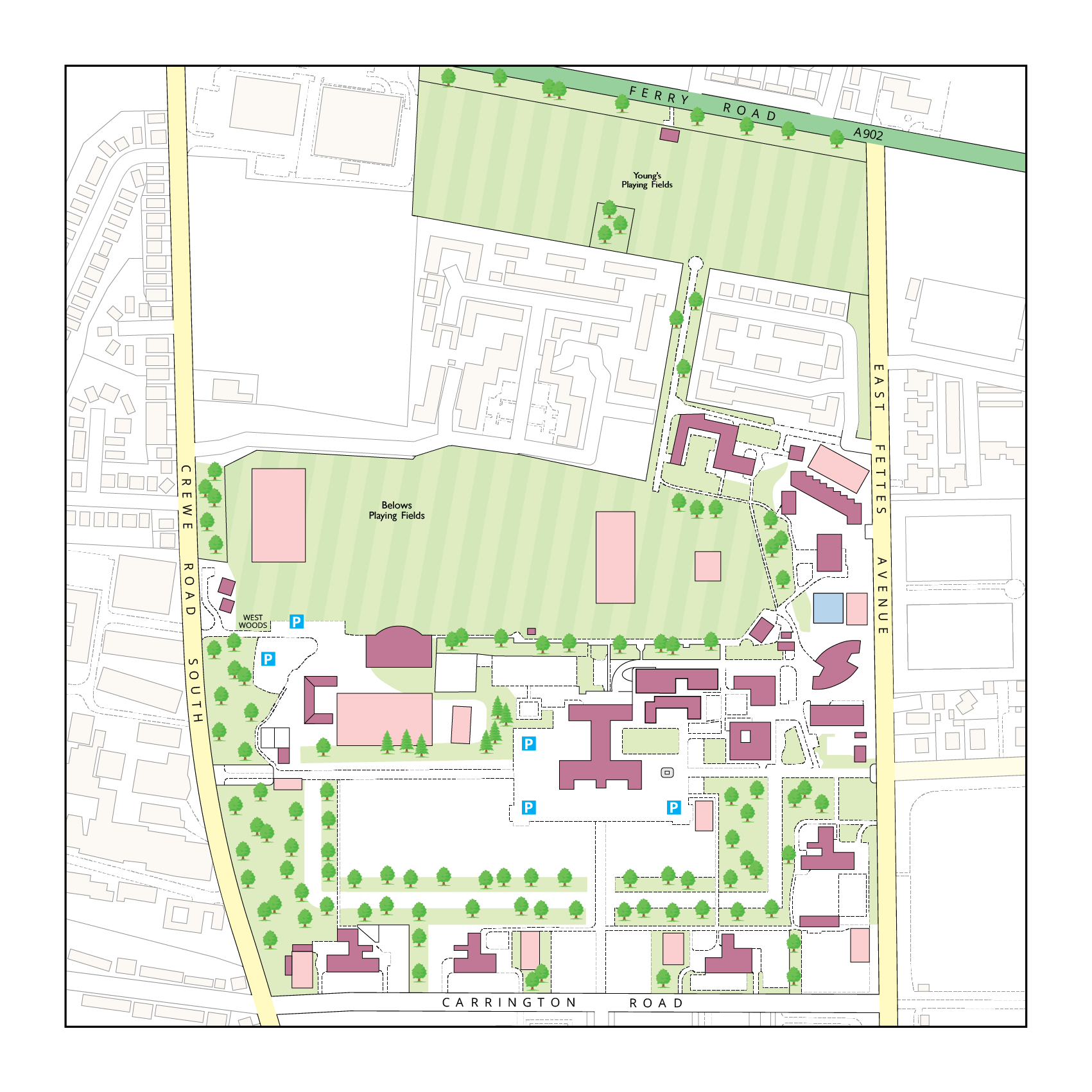
Map, location photographs and captions: Fettes College campus map. Original location numbers retained. Locations 51 and 52 share a point on the source map.
Meet the summer team and put a face to a name.
Useful information for Group Leaders during the programme.
Maps and general information published for all Group Leaders.
Manage the content seen by activity leaders.
Choose a task below, or use the section bar above.
Publish activity instructions and downloadable resources. Staff can search by age, group size, duration and equipment.
Add known unavailable periods across the six-week summer. The generator will avoid assigning that person during those periods.
Add visiting groups, set arrival and departure dates, and manage their accommodation reports. Group Leader logins and assignments are under Accounts → Group Leaders.
Create individual logins for FCLC Managers, Activity Leaders and SHLs. Group Leader accounts are managed in the Group Leaders subtab. Managers receive the full dashboard. Only Admins can create, edit or promote Manager and Admin accounts. SHLs can be assigned to a house. At least one Admin must remain; your current Admin account cannot be removed or demoted.
| Username | Staff name | Role | House | Actions |
|---|
Create the visiting group in the Groups tab, then add its Group Leaders here. Leader dates automatically use the group's arrival and departure dates, but can be changed for leaders arriving later or leaving early.
Upload general documents for every Group Leader, such as the campus map, Edinburgh map, arrival information or general guidance. Accommodation remains separate for each individual group.
Manage login details here, including accounts created before a visiting group was assigned. Use the group leader editor above for group assignments and arrival dates.
| Username | Staff name | Role | House | Actions |
|---|
Create and configure houses here. Staff membership is controlled only from Staff Accounts; assigning an account to a house automatically updates the house below.
Select exactly which supplies houses are allowed to request. Tick or untick the standard items below, and add extra items if required.
Review submitted quantities, generate individual PDFs, or combine every submitted house into one printable PDF.
Accommodation and medical reports are generated live from the FCLC reports database. The logged-in SHL's assigned house is inserted automatically and cannot be changed by the SHL.
If an SHL has no assigned house, report generation is blocked. Managers retain access to all house configuration.
Tick the locations Group Leaders should see. Unticked locations disappear from the map, key and search. Original numbers stay the same.
Add the contact names and phone numbers Group Leaders should see on their welcome dashboard. Only Admins can change these contacts. Add the number, then click Publish welfare contacts. A contact name is optional.
Changes are published when you save.
Introduce the summer management team to Group Leaders. Add a name, role and optional photo, then publish the page. These profiles do not create or change login accounts.
Published profiles appear on the Group Leaders’ FCLC Managers page.